
Zapier Alternatives
8 Best Zapier Alternatives in 2026
Zapier built the category. But per-task billing compounds fast at scale, there is no AI reasoning built into the execution model, and workflows have no memory between runs. These are the 8 best alternatives — from open-source self-hosted options to AI-native platforms — covered honestly.
Why teams look for Zapier alternatives
Zapier is a reliable tool for connecting SaaS apps with trigger-action automations. At low volume and low complexity, it works well. But three patterns push teams to look elsewhere:
Per-task billing at scale
Zapier charges roughly $0.02 per task. That sounds small, but a modest workflow running 50,000 tasks per month costs $1,000 — just for the automation layer. Costs compound linearly with volume.
No AI reasoning in the execution model
Zapier added AI steps as optional modules, but the underlying model is still trigger-action. There is no reasoning step that evaluates context, chooses a path, or adapts when something unexpected happens.
No memory between runs
Every Zap runs stateless. Zapier does not remember what happened in previous executions. Building workflows that learn from past runs or accumulate knowledge requires external databases and custom code.
Quick comparison
| Name | Best for | Pricing model | AI-native | Open source |
|---|---|---|---|---|
| AgentLed | AI-native, memory-driven workflows | Shared workspace credits | Yes | No |
| n8n | Self-hosted developer automation | Free (self-hosted) / cloud from $20/mo | No | Yes |
| Make | Visual multi-branch scenarios | Per-operation from $9/mo | No | No |
| Activepieces | Open-source Zapier replacement | Free (self-hosted) / free cloud tier | No | Yes |
| Pipedream | Code-first developer automation | Free 10k invocations/mo; from $29/mo | No | Yes |
| Lindy | Conversational personal assistant | Credits-based; free tier | Yes | No |
| Gumloop | Visual AI pipeline construction | Credits-based; free tier | Yes | No |
| Workato | Enterprise multi-system integration | Enterprise custom pricing | No | No |
AgentLed
AI-native automation with Knowledge Graph memory and MCP
AgentLed is built from the ground up for AI-native workflows. Instead of trigger-action chains, you define a goal and the platform reasons through each step using the best available model — Claude, GPT, Gemini, Mistral, or DeepSeek. A Knowledge Graph persists entities, context, and learnings across every execution, so workflows improve over time rather than running stateless. A native MCP server (open source on npm) lets Claude Code, Cursor, Codex, and any MCP-compatible client trigger and manage workflows directly from the editor.
Pros
- +No per-task billing — shared workspace credits don't compound with volume
- +Knowledge Graph memory persists context across runs
- +Native MCP server for Claude Code, Cursor, Codex
- +Multi-model routing picks the right LLM per step
- +Human-in-the-loop approval gates built in
- +White-label deployment for agencies
Cons
- –Younger product — ecosystem of pre-built templates is still growing
- –Not self-hostable (enterprise on-premise available on request)
Best for: Teams that need AI reasoning, persistent memory, and MCP integrations
n8n
Open-source, self-hostable workflow automation
n8n is the most developer-friendly open-source automation platform available today. You can self-host it on your own infrastructure, keep all data in-house, and write custom JavaScript or Python inside any node. The community has published thousands of workflow templates, and the visual editor is genuinely usable for non-engineers. AI nodes exist but are add-ons rather than core to the execution model — n8n is still fundamentally a trigger-action system.
Pros
- +Fully open source (fair-code license) — self-host or use cloud
- +Code nodes: run arbitrary JS or Python in any step
- +Large, active community and template library
- +No per-task pricing on self-hosted deployments
Cons
- –Self-hosting means you own infrastructure, upgrades, and uptime
- –AI reasoning is an add-on, not the core execution model
- –No persistent memory across runs without custom database setup
Best for: Developers who want full control and self-hosting
Make
Visual scenario builder with per-operation pricing
Make (formerly Integromat) replaced Zapier for a large number of teams because its visual scenario builder is genuinely clearer for complex multi-branch logic. You can see the full data flow at a glance and edit individual bundles inline. The pricing is per-operation rather than per-task, which can be cheaper than Zapier for high-fan-out scenarios — but costs still compound at scale. Like Zapier, Make is a trigger-action system with no persistent memory or native AI reasoning.
Pros
- +Excellent visual scenario editor — complex branching is readable
- +Broader app coverage than many competitors
- +Per-operation pricing is sometimes cheaper than Zapier at scale
- +Reliable, mature platform with good error handling
Cons
- –Still per-operation billing — high-volume workflows get expensive
- –No persistent memory between scenario runs
- –No AI-native reasoning; AI modules are limited add-ons
Best for: Teams who want a polished visual editor and broad app coverage
Activepieces
Open-source Zapier alternative with a clean UI
Activepieces is the most Zapier-like open-source option available. The interface is intentionally familiar — drag-and-drop flows, a growing library of app connectors, and a no-code-first editing experience. It is MIT-licensed, actively maintained, and can be self-hosted with Docker in minutes. If you want to move off Zapier without retraining your team on a new paradigm, Activepieces is the lowest-friction path.
Pros
- +MIT licensed — truly open source, not fair-code
- +Familiar Zapier-like interface; minimal retraining required
- +Self-host with Docker in minutes
- +Active development and growing connector library
Cons
- –Smaller connector library than Zapier or Make today
- –No AI reasoning or persistent memory built in
- –Community and support ecosystem is still maturing
Best for: Teams that want open-source and a Zapier-like experience
Pipedream
Developer-first automation with code and no-code steps
Pipedream sits squarely between no-code automation and writing code by hand. Every workflow step can be a pre-built action or arbitrary Node.js, Python, Go, or Bash code. The free tier is genuinely generous — 10,000 invocations per month with no credit card required. It is a strong choice for developers who want the control of custom code without maintaining infrastructure. AI steps exist but are not central to execution.
Pros
- +Code-first: write Node.js, Python, Go, or Bash in any step
- +Generous free tier (10,000 invocations/month)
- +Connects to any HTTP API; custom sources and destinations
- +Open-source component registry
Cons
- –Less visual than Make or Activepieces — steeper curve for non-developers
- –No persistent memory between workflow runs
- –Costs can scale at higher invocation volumes
Best for: Developers who want code-first automation with a generous free tier
Lindy
AI-native personal assistant workflows
Lindy takes a conversational approach to automation — you describe what you want an AI assistant to do and it handles the task. It is designed primarily for personal productivity workflows: managing email, scheduling, research, and summarization. The AI layer is the central interface rather than an add-on. It is not designed for complex multi-step business process automation, but for individuals who want an AI assistant that connects to their tools.
Pros
- +Conversational interface — describe workflows in plain language
- +Strong email, calendar, and research automation
- +AI-native from the start, not bolted on
Cons
- –Best suited for personal assistant tasks, not complex business processes
- –Limited connector ecosystem compared to Zapier or Make
- –Less control over execution logic than developer-focused tools
Best for: Individuals and small teams who want conversational AI automation
Gumloop
Visual AI pipeline builder
Gumloop is focused specifically on AI pipeline construction — connecting LLMs, scrapers, data transformers, and outputs into visual flows. It is a good fit for teams that need to build AI-powered data pipelines without writing code, particularly for content generation, research, and data enrichment workflows. It is not a general-purpose automation platform and does not have the breadth of app connectors that Zapier or Make offer.
Pros
- +Purpose-built for AI pipeline workflows
- +Visual editor designed around LLM steps
- +Good for content generation and data enrichment tasks
Cons
- –Narrower scope than general-purpose automation platforms
- –Smaller connector library for SaaS integrations
- –Less suitable for complex multi-system business processes
Best for: Teams building AI pipelines with a visual interface
Workato
Enterprise-grade automation for complex business logic
Workato is the enterprise tier of the automation market. It is built for organizations that need governance, role-based access control, audit logs, and the ability to run thousands of automations across dozens of enterprise systems simultaneously. The platform supports complex conditional logic, data transformation, and compliance requirements that consumer-grade tools cannot handle. It is significantly more expensive than Zapier and not designed for individual users or small teams.
Pros
- +Enterprise-grade governance, audit logs, and access controls
- +Handles complex multi-system integration at scale
- +Strong support and SLA commitments
- +Extensive connector library for enterprise systems (SAP, Salesforce, etc.)
Cons
- –Priced for enterprise budgets — not suitable for SMBs or individuals
- –Significant onboarding complexity compared to simpler tools
- –No AI-native reasoning built into the core execution model
Best for: Large enterprises with complex multi-system integration requirements
How to choose
The right Zapier alternative depends on what is actually breaking down for you today. Most teams fall into one of these four categories:
If: You need full data control and self-hosting
Then: n8n or Activepieces. Both are open source, self-hostable, and have no per-task pricing when you run them yourself.
If: You are a developer who wants to write code inside workflows
Then: Pipedream. Every step can be arbitrary Node.js, Python, Go, or Bash, with a generous free tier and no infrastructure to manage.
If: You need AI reasoning, memory, and MCP integration
Then: AgentLed. It is the only option on this list where AI is the core execution model — not an add-on — and where a Knowledge Graph persists context across runs.
If: You are a large enterprise with complex compliance needs
Then: Workato. It is priced for enterprise, built for it, and has the governance features that consumer-grade tools lack.
Migration guide
Moving workflows from Relay.app?
Use the shutdown window to export first, choose the workflows that still run, and rebuild them under supervision.
Follow the practical Relay.app migration checklist →When replacement becomes an operating-model decision
If the workflow needs judgment, business context, memory, evaluations, or approvals, the hard part is no longer choosing automation nodes.
See how a forward-deployed AI workflow is scoped and operated →Product evidence
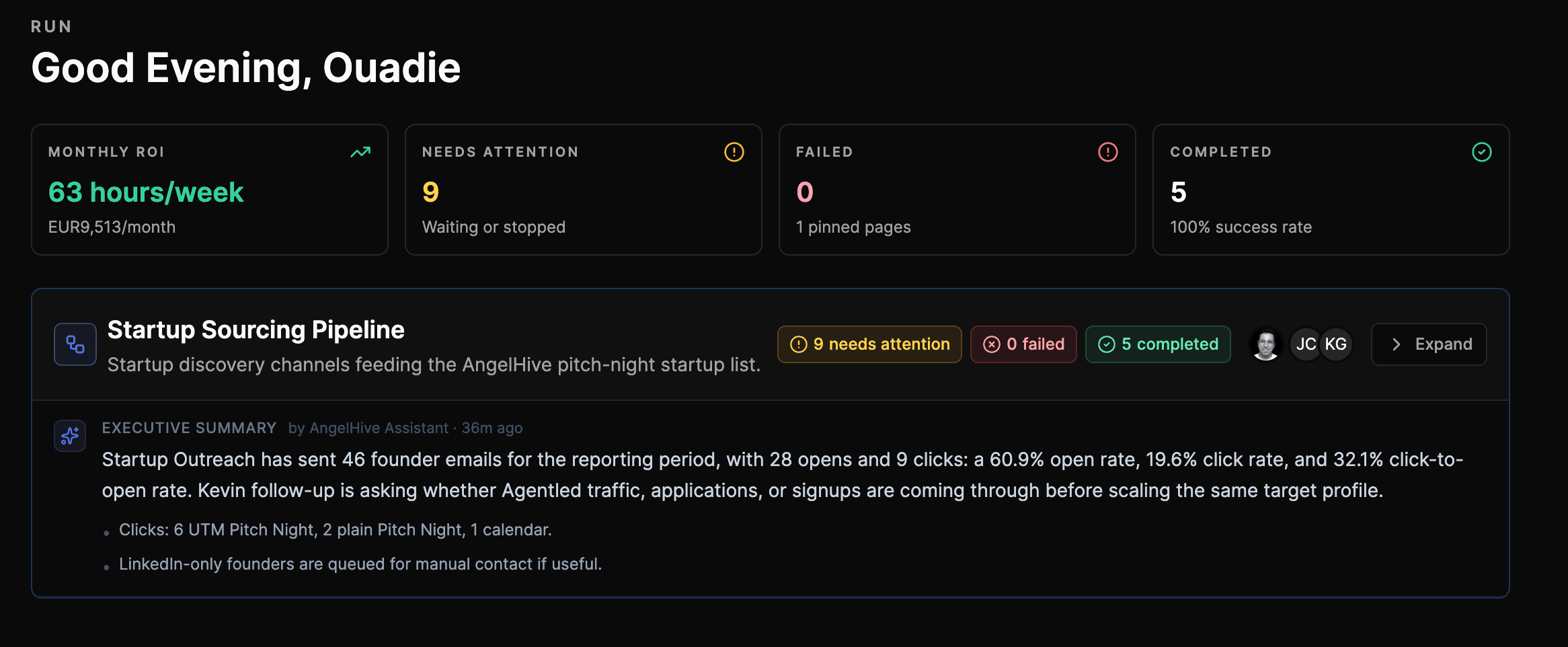
A real supervised AgentLed workspace
This customer workspace shows execution health, work waiting for review, completed runs, and ROI reporting in the same operating view.
Comparison claims are reviewed against current public product documentation and hands-on AgentLed product use. Pricing and packaging can change; verify them with each vendor before purchasing.
Sources checked
Reviewed by Ouadie BOUSSAID ·
Try the workflow
Describe what you want to replace, not the tool you want to copy
AgentLed opens a custom agent setup where you can describe the workflow you want to replace and keep control of connected tools and consequential actions.